Major comparisons between Divi and Elementor
Do you want to know what are the major differences between Divi and Elementor, the most popular theme builders for WordPress?
One of the main complaints about building website using WordPress is that you don’t have freedom to create whatever you like as compared to building a website with coding where you have freedom to create according to your creativity. This defect of wordpress can be overcome by theme builder.
What is theme builder in WordPress?
Theme builder allows you to customize your website. Since the most popular platform for building websites is WordPress, developers have worked on making theme builders for WordPress website so that you can do more customization and create a website without having the knowledge of code.
There are many theme builders out there, let’s talk about two popular theme builders Divi and Elementor.
Comparison between Divi and Elementor
1- Price:
Elementor : The Elementor is available in two versions free & pro. The pro plan goes like this:
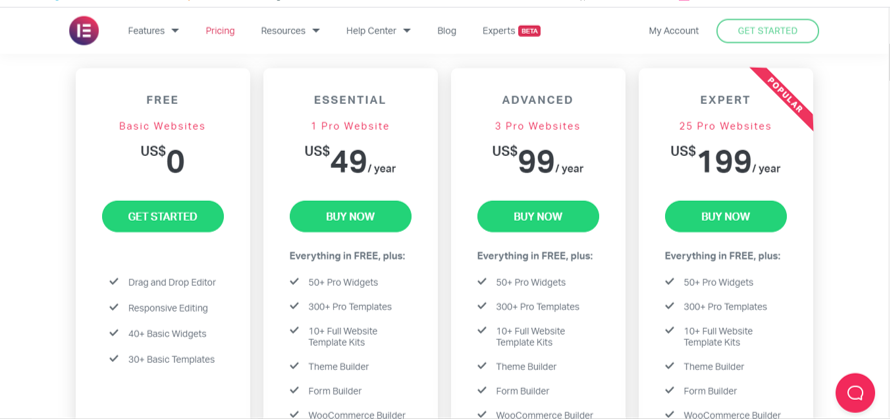
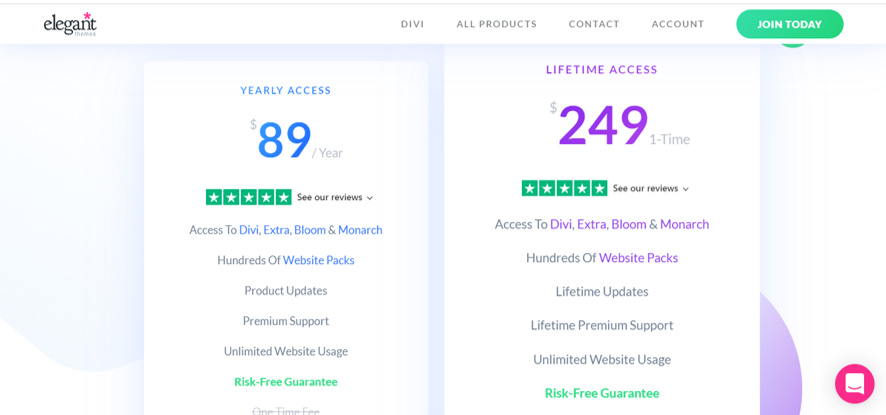
Divi: The Divi is only having pro with unlimited websites plan.
2- Support:
Elementor: The Elementor has basic email and chat support. If you get stuck at any point while using Elementor, you can email your problem to the support team along with chat support.
Divi : The Divi has gone one step further in support option. There is online chat support and remote support which is unique to Divi. In remote support the member from divi support team can access your website and solve your problem. To turn on Remote support Go to wp dashboard > Divi >Support Center turn on Remote access.

Summary:
Both have good support but Divi is one step above in support. If you are a beginner you will need a support system like divi where support team can check the errors in your website and fix them for you.
3- Trial version:
Elementor: The Elementor provides the free access where you can test out its basic features for free and create a simple website without paying any amount. You will not have access to all features of Elementor in trial.
Divi : divi also offers trial version but this testing is only for demo purpose. You cannot make website by this demo. You can try all the features of divi in demo whereas in Elementor you can try some basic features.
4- Built in features:
- Padding & Margin :
Divi – By dragging section to up and down
Elementor -By value only for ex. 24px
- Forms module :
Divi – You cannot add file attaching option.
Elementor – You can allow to upload files in the form
- Columns width
Divi – Requires additional css to change the width of columns
Elementor – Variable width of column
- Adding svg
Divi – You need plug in for importing svg
Elementor – Buit-in support for svg
- Splitting test
Divi – You can make two designs for a page and view both alternatively. This helps in knowing which design is doing well.
Elementor – No splitting test option
- Editing options
Divi – Pop up window which can be moved anywhere.
Elementor – Fixed at left side of the page which compromises with the view of the page you are working on.
- Universal color
Divi – By one click you can change the color of specific element by using universal color feature.
Elementor – No universal color option.
5- Premade themes:
Elementor: Elementor has nice premade layouts and there is a plug in from envato elements that provides many premade layouts for free and there are paid layouts as well.
You can import a specific page or a section of the page from premade layouts.
Divi: Divi has also premade layout organized with categories and they provide free elements and layouts every day if you are the subscriber of their email list.
In Divi you cannot import a specific page from premade layout for example if you like Home page of a template than you will have to import the whole website with all pages like contact page, about page etc. you cannot just import the home page.
According to me this is good because having different pages from different templates might lead to the inconsistency in the overall design of the website which some beginner designers cannot identify and I have seen this issue with Elementor users(Imported elements from another design which does not match with the overall design of website).
6- Plug-ins and add-ons:
Elementor: The Elementor has lot of build in features to customize your website but there are some free plug ins that make Elementor more creative platform. There are some premium plug-ins as well which will help you in making websites with dynamic content.
Divi: divi is not generous when it comes to add-ons and plug-ins. In fact divi has a market place where developers create and upload plug-ins and you can buy them.
Most of plug-ins and add-ons are paid in divi.
Divi has collaboration with codable team where developers can help you to add any feature to your divi website with coding.
The one time price of Divi justifies the marketplace of divi for paid plug-ins as it is very cheap when compared to Elementor pro.
Summary:
If you are running a freelancing agency or you are an individual who can afford buying both of theme builders than it is recommended to have both of them. Learn both and use them both according to the projects.
If you don’t have enough budget or you are new to wordpress than Divi is recommended for you.